How to Add Video to Your Portfolio Without Killing Page Speed
You spent eighty hours on a case study. You recorded every interaction, every prototype, every A/B test result. Then you exported a 120MB MP4, dropped it on your portfolio, and published. The recruiter who clicks your link is now waiting twelve seconds for a blank rectangle to become a video. They’ve already moved on. This is fixable — and the fix takes less than five minutes per video.
The problem is silent
Nobody tells you your portfolio is slow. The recruiter just doesn’t call back. The potential client refreshes and gives up. You have no idea the 180MB “high quality” export from After Effects is the reason your case study has a 73% bounce rate.
Portfolio videos have specific failure modes that don’t apply to other contexts. The files come from design tools — After Effects, Figma’s “export prototype” feature, screen recorders, phone cameras. None of those export pipelines are optimized for web delivery. They’re optimized for quality preservation. And “quality preservation” on the web means: huge file, slow load, unhappy visitor.
Why “export for YouTube” settings are wrong
The most common portfolio mistake is exporting with “YouTube” or “Vimeo” presets from Premiere or After Effects. Those presets target 8–16 Mbps bitrate — optimized for a video platform that recompresses your footage anyway, on a CDN engineered for streaming large files.
On your personal site, you’re serving that file from wherever you host. There’s no adaptive bitrate streaming, no CDN pre-warming, no edge caching. The target for portfolio video is 1–3 MB for a 15-second clip and 4–8 MB for a 60-second clip. At those bitrates, UI screen recordings and prototype walkthroughs look excellent — screen content compresses far more efficiently than camera footage.
The right format pair: WebM first, MP4 fallback
Browsers pick the first <source> they can play inside a <video> element. Serve WebM (VP9) first — it’s smaller and plays in every browser made since 2022. The MP4 (H.264) is the safety net for older browsers and the small fraction of Safari users still on pre-2022 versions.
The poster frame is not optional
The poster attribute specifies an image to show before the video loads. Without it, you get a blank rectangle. For a portfolio, that blank rectangle sits in your case study for 2–10 seconds depending on the visitor’s connection. It looks broken. It makes your work look unpolished. The poster should be the first frame of the video — ideally exported as WebP (25–40% smaller than JPEG).
Practical checklist for portfolio video
- Export your source at 1080p maximum. 4K doesn’t help on a portfolio; it only inflates your file size.
- Convert to WebM (VP9) at 600–1000 kbps for screen recordings, 1000–1800 kbps for camera footage.
- Convert to MP4 (H.264, faststart) at 900–1500 kbps for screen recordings as a fallback.
- Extract the first frame as a WebP poster.
- Use the correct HTML and set explicit width/height to prevent layout shift.
<video
  autoplay muted loop playsinline
  poster="case-study-poster.webp"
  width="1280" height="720"
>
  <source src="case-study.webm" type="video/webm" />
  <source src="case-study.mp4"  type="video/mp4"  />
</video>
What this actually does for your portfolio
A recruiter opening your case study on their phone during their commute is on a variable LTE connection. Your 120MB MP4 would have loaded a blank rectangle and maybe started playing at the 15-second mark. Your 4MB WebM starts playing in under a second, with the poster visible immediately.
The work is the same. The delivery is what changes whether it gets seen.
Performance isn’t just a developer concern. For a product designer, your portfolio site is itself a product. How it performs is part of what you’re communicating.
[ ABOUT EXPORTFORWEB ]
Quick product questions
Is ExportForWeb free?
Yes. ExportForWeb is a free download on the Mac App Store, and every conversion feature is free to use, with no subscription or paid tier.
Do my files leave my Mac?
No. Conversion happens entirely on your Mac. Your source media and finished exports are never uploaded to us or sent to a cloud conversion service.
What can I export?
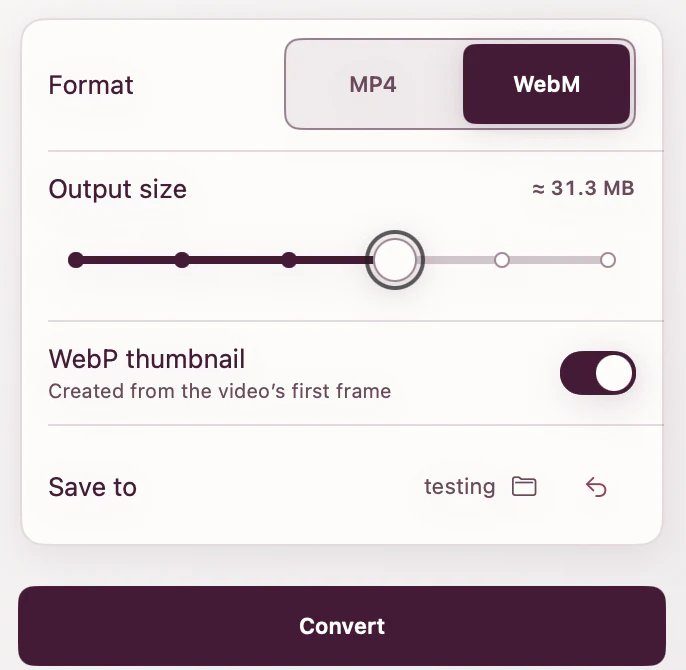
Videos become WebM or MP4, with an optional first-frame WebP poster. JPEG, PNG, HEIC, HEIF, TIFF, BMP, and WebP images become WebP.
[ FREE & PRIVATE ]
Your portfolio deserves better than a 120MB MP4.
ExportForWeb converts videos to WebM or MP4 with an optional WebP poster — and converts portfolio images to WebP too. Every feature is free, with no subscription or paid tier. Conversion stays on your Mac, so your media is never uploaded.
Download free