How to Repurpose Social Media Videos for Your Website
You’re already producing video content for Instagram, TikTok, LinkedIn, or YouTube. That content represents real work — scripting, shooting, editing, posting. And it’s sitting on a platform you don’t own, driving traffic to someone else’s domain. Repurposing your best social videos onto your own site is one of the highest-leverage marketing moves you can make. The catch is that social exports are completely wrong for web delivery.
You already have the content — you just need the right format
Your TikTok testimonial, your Instagram product walkthrough, your LinkedIn launch announcement — these are proven pieces of content. Putting them on your own landing pages and case studies isn’t lazy repurposing. It’s extending the reach of content that already works into a channel you actually control: your website.
Why social exports are terrible for web embedding
File size
Social platforms often encode at high bitrates to preserve quality for their own recompression pipeline. An Instagram download of a 30-second clip might be 40–80MB. On your website, that means a 10–15 second wait before anything plays on a typical mobile connection.
Missing web metadata
MP4 files need the moov atom at the front to support streaming playback. Social platform downloads often have this at the end — meaning the entire file must download before playback begins.
Wrong format — only one codec
Social downloads are always MP4/H.264. There’s no WebM version. Every visitor to your site gets the larger, less-efficient format, even when their browser supports VP9 WebM. You’re leaving 30–50% file size savings on the table.
The aspect ratio problem
Vertical 9:16 video from Reels, TikTok, or Shorts looks completely broken in a standard horizontal web layout. Two options: re-export at 16:9 from your original source (cleanest), or use CSS object-fit: cover to crop within a fixed-ratio container.
Target file sizes for your site
| Use case | Target size | Notes |
|---|---|---|
| Hero background loop | < 5 MB | Muted, autoplays, short duration |
| Product walkthrough / demo | < 8 MB | Click-to-play or observer-triggered |
| Testimonial / talking head | < 15 MB | Camera footage compresses less efficiently |
| Long-form (5+ min) | Use a video host | Vimeo, Cloudflare Stream, Mux |
The workflow: Social → ExportForWeb → Your site
- Go back to your original source file — not the social download. The highest-quality version with no watermarks.
- Trim and re-crop for web context if needed — cut to the most impactful 15–30 seconds for a hero loop.
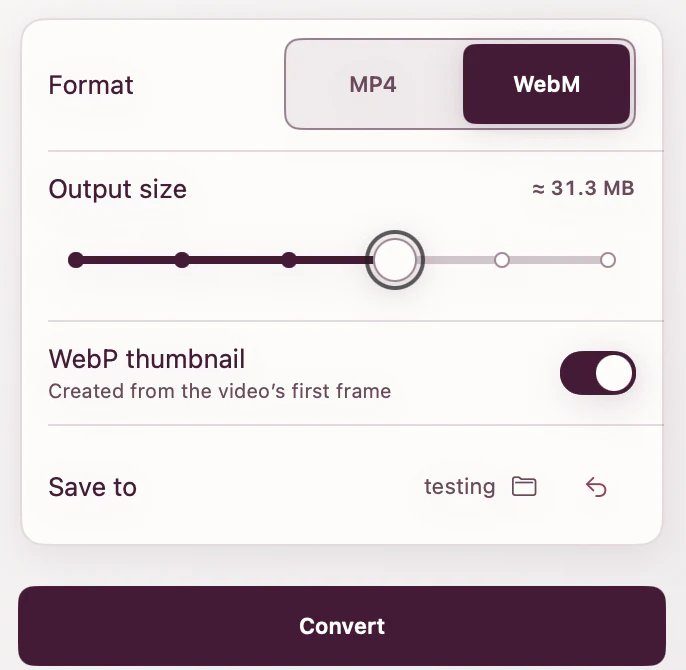
- Drop it into ExportForWeb. Choose WebM (VP9) or MP4 (H.264, faststart), then add a first-frame WebP poster if you need one.
- Upload the three files to your site and use the correct HTML markup.
<video autoplay muted loop playsinline
  poster="testimonial-poster.webp"
  width="1280" height="720"
>
  <source src="testimonial.webm" type="video/webm" />
  <source src="testimonial.mp4"  type="video/mp4"  />
</video>
Why this matters beyond file size
Social platforms are rented land. The algorithm changes, the platform declines, or your account gets restricted. Your website is the one place you control. A TikTok gets its traffic in the first 48 hours and then disappears. A well-optimized page on your site with a great video can rank in search, get linked to, and drive signups for years.
The best social content you’ve made is sitting on someone else’s platform. Your website is where it can actually work for you permanently.
[ ABOUT EXPORTFORWEB ]
Quick product questions
Is ExportForWeb free?
Yes. ExportForWeb is a free download on the Mac App Store, and every conversion feature is free to use, with no subscription or paid tier.
Do my files leave my Mac?
No. Conversion happens entirely on your Mac. Your source media and finished exports are never uploaded to us or sent to a cloud conversion service.
What can I export?
Videos become WebM or MP4, with an optional first-frame WebP poster. JPEG, PNG, HEIC, HEIF, TIFF, BMP, and WebP images become WebP.
[ FREE & PRIVATE ]
Turn your social content into a web asset.
Drop in a source video for WebM or MP4 with an optional WebP poster. Still images become WebP too. Every feature is free, with no subscription or paid tier. Conversion stays on your Mac, so your media is never uploaded.
Download free